


-
Written By Simran Bhatia
-
Updated on May 28th, 2026
How to Export Google Workspace to MBOX: Best Methods
User Query:
Our company is shutting down a few old Google Workspace accounts, and I need mailbox copies in MBOX format before removing them. Google Takeout is taking forever with larger mailboxes, and downloading users one by one is becoming difficult. Is there any easier way to export Google Workspace emails to MBOX without spending days handling it manually?
Summary: Google Workspace mailboxes usually contain years of business emails, attachments, and internal communication data. Many users now export Google Workspace to MBOX to keep mailbox copies offline or open them inside email clients like Mozilla Thunderbird. Google Takeout still works for smaller exports, but larger mailboxes often take longer and become harder to manage manually. CloudXena Google Workspace Backup Tool gives users another way to save Google Workspace mailbox data into MBOX format without handling every account separately.
Quick Answer
What is the easiest way to export Google Workspace emails to MBOX?
Google Takeout can create MBOX archives from Google Workspace accounts, but handling multiple users or larger mailboxes manually often becomes slow. CloudXena Google Workspace Backup Wizard gives users a more direct way to export Google Workspace data to MBOX while keeping mailbox folders and attachments accessible after export.
What Are the Methods To Save Google Workspace As MBOX?
For many users, Google Takeout is still the first method they try while exporting Google Workspace mailbox data into MBOX format. Since it is Google’s own service, many people use it for basic mailbox downloads. However, once mailbox size starts increasing or multiple accounts come into the picture, handling everything manually becomes difficult; many users also move toward dedicated backup tools for a simpler export process.
How Do You Export G Suite To MBOX Manually?
Most users rely on Google Takeout when they need MBOX copies from Google Workspace accounts. The method works, although larger mailbox exports usually take more waiting time before the archive becomes available.
- To begin with, open Google Takeout in your browser and sign in with your Google Workspace account.
- Once the dashboard appears, click on Deselect All because Google selects multiple services automatically.
- After that, move through the list and check only the services you actually want to export.
- Then scroll toward the bottom area of the page and press Next Step.
- At this stage, choose the delivery option as Send Download Link via Email.
- Now select .zip as the archive type and pick the preferred file size as required.
- Keep the export frequency set to Once and continue further.
- Next, click on Create Export and wait while Google prepares the mailbox archive.
- After some time, Google sends the download link directly to your Gmail inbox.
- Download the ZIP file, extract the data, and the mailbox becomes available in MBOX format.
What Are The Shortcomings Of Manual Export Methods?
- Larger Google Workspace exports usually take a long time to finish.
- Google may split mailbox data into multiple ZIP archives automatically.
- Exporting several user accounts means repeating the same steps.
- Download links sometimes expire before larger archives are fully saved.
- Managing exported MBOX files later becomes confusing with multiple labels.
- Users do not get much control over selective mailbox export filtering.
- Internet interruptions can delay the archive generation or download process.
What Is The Expert Way To Export Google Workspace to MBOX?
Smaller Google Workspace exports are still manageable through Google Takeout. Things usually become harder once the mailbox size and user count start increasing. To counter that issue, users now prefer the CloudXena Google Workspace Backup Tool for a more direct export process. The software saves Google Workspace emails into MBOX format without creating repeated archive downloads. Mailbox folders and attachments also remain available after export. The tool also lets you export Google Workspace emails to PST and other formats.
Steps To Convert Google Workspace to MBOX Are:
- To begin, install and launch CloudXena Google Workspace Backup Wizard on your PC and then click on Continue.
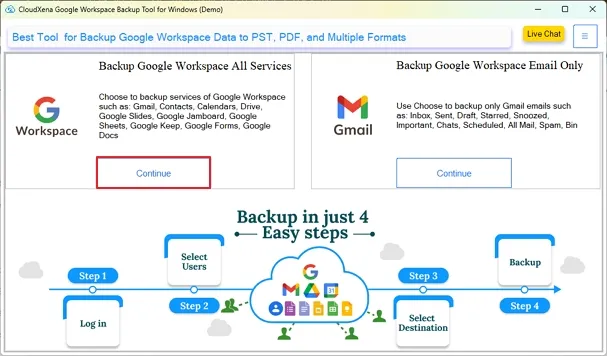
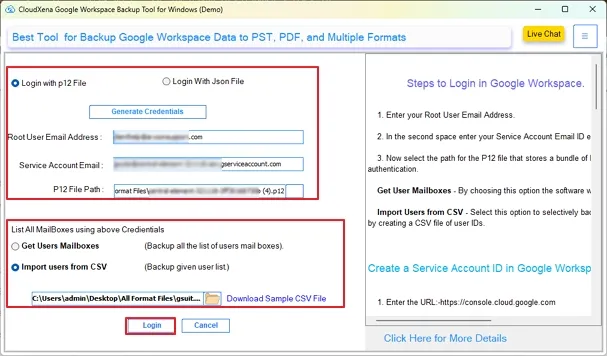
- After that, you have to choose a login method, either with a P12 or a JSON file, and fill in the required details. After entering details, click on the Login button.
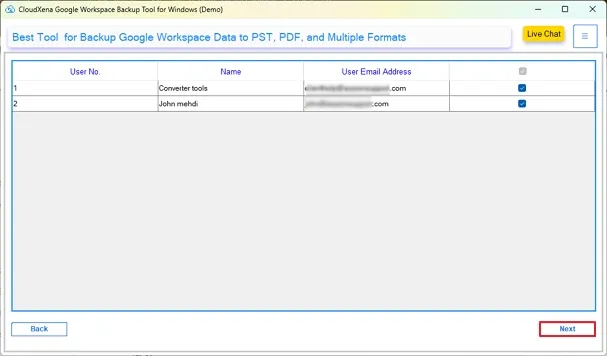
- Further, the tool will fetch user accounts and check the ones whose data you want to export.
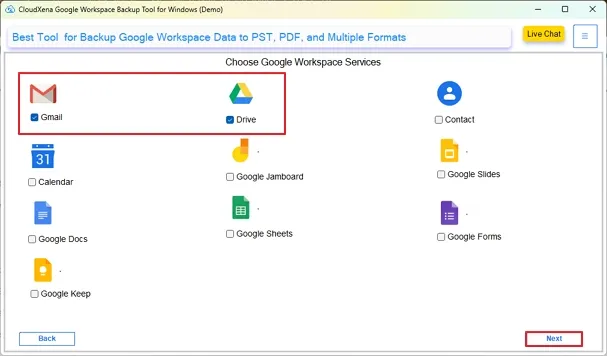
- Moving ahead, check all the Google Workspace services from which you need to get the data.
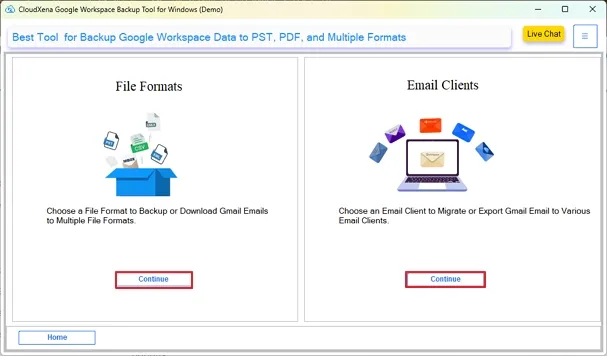
- Moving on to the next panel, click Continue under the File Formats option.
- Then, choose MBOX from the drop-down menu, and you can also apply the additional filters.

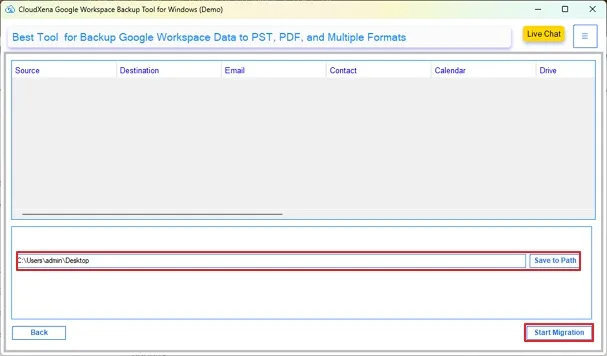
- In the end, click on the Save To Path and specify the destination path, and then tap on Start Migration.
Why Do Users Choose This Google Workspace Backup Tool?
- Google Workspace emails can be moved into MBOX without generating Takeout files every time.
- Managing several Google Workspace accounts together feels far less repetitive during export.
- Mailbox folders and attachments remain available after the export process finishes.
- Only the required mailbox data can be selected before starting the process.
- Different saving formats are available apart from MBOX for backup needs.
- The process feels less confusing compared to handling mailbox exports manually.
Real Case Scenario
One company needed mailbox copies from old Google Workspace accounts before removing former employees from the organization. They used Google Takeout, but several mailbox exports resulted in multiple archive parts and became harder to manage later.
Things became slower once more user accounts were added to the export list. Later, the team used CloudXena Google Workspace Backup Utility to save the required mailbox data into MBOX files locally. That backup later helped them access older client emails without reopening those Google Workspace accounts again.
To Wrap Up
Many users still export Google Workspace to MBOX through Google Takeout for smaller mailbox data. The process starts becoming difficult once multiple user accounts and larger mailboxes are involved. Archive downloads also become harder to organize later.
Because of that, many admins now prefer CloudXena Google Workspace Backup Software for handling mailbox exports more directly. It gives users a simpler way to keep Google Workspace emails available locally in MBOX format without depending fully on active cloud accounts later.
Frequently Asked Questions
Q1. How do admins export multiple Google Workspace mailboxes into separate MBOX files together?
Ans. Handling every Google Workspace account manually through Google Takeout usually takes longer in the long run. Many admins instead use CloudXena Google Workspace Backup Tool to process multiple mailbox exports together into MBOX format.
Q2. Why do larger Google Workspace MBOX exports arrive in split ZIP archives?
Ans. Google Takeout often divides larger mailbox exports into multiple archive parts automatically. Because of that, many users prefer CloudXena G Suite Backup Software for handling larger mailbox exports more directly into MBOX format.
Q3. Can Google Workspace labels and nested mailbox folders remain preserved in MBOX format later?
Ans. Yes, mailbox folders and email arrangement usually remain available after export. Many users prefer the CloudXena Google Workspace Backup Tool because handling the mailbox hierarchy manually later becomes difficult with larger exports.
Q4. What is the easiest way to archive inactive Google Workspace accounts into local MBOX files?
Ans. Many organizations first create local MBOX copies before removing inactive employee accounts permanently. CloudXena G Suite Backup Software helps users keep older mailbox data accessible outside active Google Workspace accounts.
Q5. Can I move exported Google Workspace MBOX files into another email client later?
Ans. Yes, many users later open exported MBOX files inside clients like Mozilla Thunderbird for offline mailbox access. CloudXena G Suite Backup Software also supports other saving formats for users handling migration work later.
About The Author:

I, Simran Bhatia am a Technical Content Writer specializing in data management, email migration, and data recovery IT solutions. My focus is on simplifying complex processes into clear, practical guides that combine technical accuracy with real-world value for IT admins, decision-makers, and everyday users. For me, writing is not just about explaining technology, it’s about making it accessible, reliable, and valuable for readers.
Related Post


