CloudXena

Enterprise-Ready PST Conversion for Smooth Email Migration, Archiving, and Data Management

PST File Converter

Rated ( 4.9/5 ) by 754 Users

CloudXena PST File Converter is an advanced solution designed to convert Outlook files into large-scale file formats PST, MBOX, EML, MSG, DOCX, PNG, ICS, VCF, PDF, CSV, MD, JSON, Mozilla Thunderbird and email clients Microsoft 365, IMAP Server, Google Workspace, Outlook.com, GoDaddy . This makes the conversion process easier while maintaining data integrity and metadata. Its simple interface allows users to migrate, back up, & archive PST data from different platforms. This software is suitable for both Windows & Mac systems.

Note: You can also view, open, and browse PST files without importing them into Outlook.

  • Helps to detect corrupted, blank, or locked files at the beginning.
  • orts in more than 10+ file formats, such as PST, MBOX, CSV, PNG, & more.
  • Reliable for converting single or multiple PST files simultaneously.
  • Detects duplicate emails based on To, Body, From, Subject, & CC.
  • Works securely on Windows and Mac operating systems.
product-box
Local Data Processing GDPR Focused Data Protection Secure Data Handling Build for MSPs SMB Ready
One PST. Multiple Data Types. Clear Handling
Outlook Data Handling
Emails Preserved
Attachments Separate, Merged, or Exclude
Contacts Supported Export Format
Calendars ICS
Tasks Available in Preview
Notes Available in Preview
Headers Supported Export
Folder Structure Previewed where supported
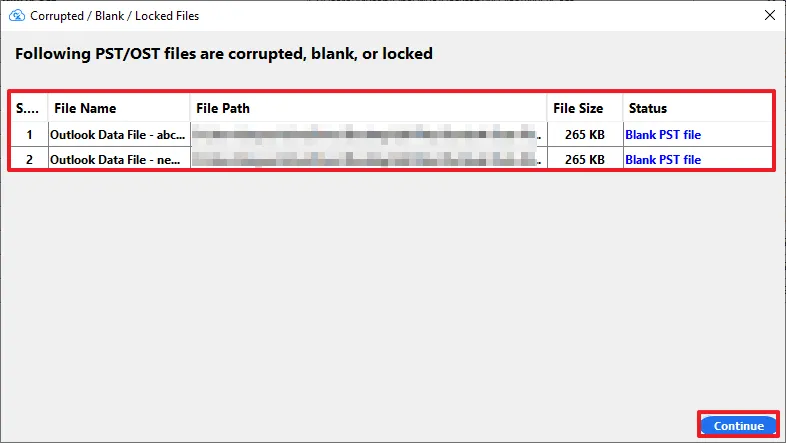
Detect Corrupted/Blank/Locked PST/OST Files

Outlook data files don’t always cooperate. Sometimes a PST or OST file turns out to be corrupted, completely blank, & locked for access. This CloudXena PST to Office 365 Migration Tool is built to detect these types of files at the beginning.

As soon as files are found, they’re listed with all the details:

  • Serial No.: Easy reference for each file found.
  • File Name: Identifies the exact PST/OST file.
  • File Path: Shows precisely where the file is stored on your system.
  • File Size: Displays the size of each flagged file.
  • Status: Marks the file as corrupted, blank, or locked.

Once reviewed, just hit Continue to proceed with the rest of your files without interruption.

step-1
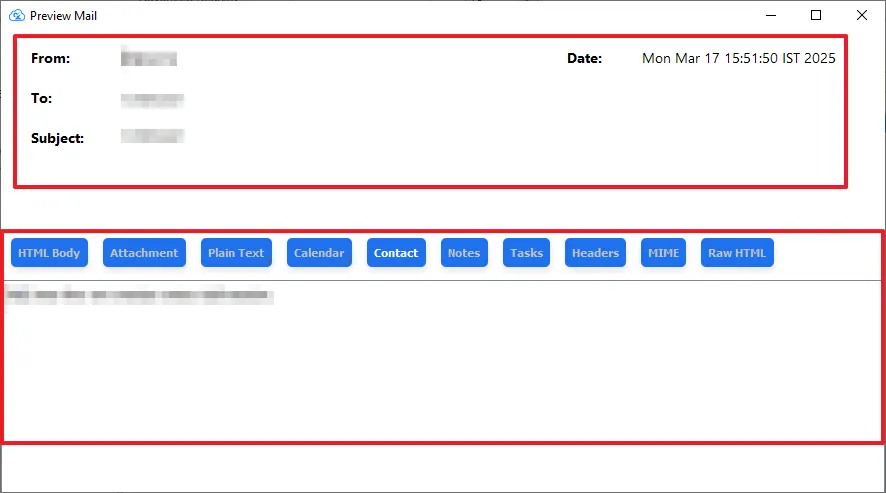
Preview Mail
step-1

This feature of the Outlook PST file converter lets users view selected email content before conversion. It displays key details such as From, To, Subject, & Date. Along with that, it shows HTML Body, Attachment, Plain Text, Calendar, Contact, Notes, Tasks, Headers, MIME, and Raw HTML. It helps users to inspect different components of an email before proceeding with the conversion.

Key Capabilities of CloudXena PST File Converter

Core features of this software that help with selective data conversion/migration as per the requirements.

bulk-file

Bulk Conversion

With this software, save time by exporting several files at once. It processes batch Outlook PST files efficiently while maintaining metadata and attachments during every conversion.

remove-duplicates

Duplicate Detection

Enable this feature: it detects duplicate files and removes them using smart filters based on Subject, Body, From, and To. This PST Converter Tool helps to keep your mailbox clean and organized.

conversion

Convert Emails from Specific Years

To get only a specific period of data in your destination mailbox, enable the date filter. Enter the Start Date and End Date to move the given time-period data.

email-attachments

Attachment Handling

Handle attachments according to your needs; this PST File Converter comes with three options: Export attachments separately, Merged Attachments, and Exclude Attachments.

export

Skip Existing Files

Helps to move files that are newly created. It helps to prevent duplicate files in the destination at the time of OST/PST conversion.

folder-name

File Naming Policy

This naming convention feature automatically renames the emails and files during the conversion process. It is only enabled for EML, MSG, DOCX, PNG, ICS, VCF, PDF, JSON, or MD.

Selective Email Conversion via Date Filter

Custom Output Folder

Enable this filter to assign a custom name to your important files. It makes it easier for users to remember the file name for future use.

smooth-bulk-file

Split Oversized MBOX/PST Data

Use this segmentation to divide large files into smaller files. It helps to reduce the risk of file corruption. The user can split MBOX files in two ways: either into a Single MBOX file per folder or by dividing it into a specific size.

preview

Output Location

Users can define the destination path according to their preferences. This makes file management easier, especially during large-scale conversions.

secure

Follow Tree Hierarchy

This helps to preserve the original folder hierarchy. It makes sure that the emails remain the same in the destination as it is in the source.

user-friendly

Mapped with Default Mailboxes

Enable this filter to align the source mailbox with a destination equivalent, which saves time and effort.

Custom File Naming & Save Path

PDF Size Restriction

Outlook PST Converter allows users to split large PDF files into 500 MB per folder, which helps to manage & store PDF files easily.

Handling Large PST Files

Large Outlook archives can contain years of emails, attachments, and folders. Processing them in one step can make file management difficult. CloudXena PST Converter Tool provides options to process large PST and MBOX data in manageable batches while keeping the original folder structure organized.

Manage Large PST Data With Flexible Processing

Large Archive Processing

Process large PST files without manually dividing the source data beforehand. The software supports batch conversion when working with multiple PST files.

Check Available Disk Space

Large conversions require sufficient storage for the output files. Before starting a batch job, make sure the selected destination drive has enough free space for the expected output.

Tip: For very large archives, use segmentation & make sure adequate storage is available before starting the conversion.
How Large PST Processing Works
01
Select PST Files Choose the PST files to convert.
02
Scan Data Detects corrupted, blank, or locked files.
03
Choose Output Pick your desired export format.
04
Apply Segmentation/Filters Set date range or split large files.
05
Select Destination Choose where converted files will be saved.
06
Start Conversion Begin the PST conversion process.
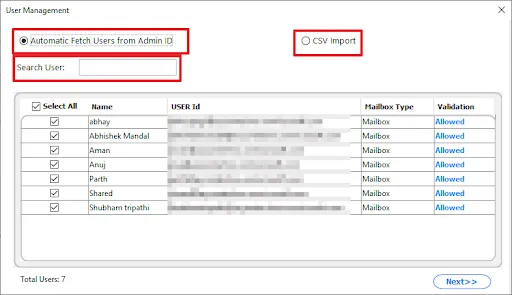
Look How User Mapping Works

Whenever a user migrates to an email client such as Microsoft 365 or Google Workspace, each source user needs to connect with the correct destination users. These custom mapping features allow users to manually assign source-to-destination. In this PST converter software, there are two ways for users to map:

Once users are loaded, you get a clean, organised view:

  • Single User: Quickly locate a specific account instead of scrolling through the list.
  • Select All: Choose every user in one click, or pick individual ones as needed.
  • Name & User ID: See exactly whose mailbox you’re working with.
  • Mailbox Type: Know the category of each account at a glance.
  • Validation: Instantly confirms whether each user is "allowed" for processing.

With the total user count displayed right at the bottom, you always know how many accounts you’re handling before moving ahead.

Once your selection is ready, hit Next >> and continue with confidence.

Simple selection. Clear validation. No manual hassle.

step-1
Migration Reports & What You Can Verify

A conversion report gives you a clear record of what happened during the process. Instead of checking every output manually, users can review the report to identify completed conversions, skipped items, & files that need attention.

What Can You Verify?

01
Files Processed

Total files included in the job.

02
Successful

Successfully converted files or items.

03
Failed

Items requiring attention.

04
Skipped

Items excluded during processing.

05
Duplicates

Items identified as duplicates.

06
Error Details

Processing issues and relevant details.

✓ Check successful items  →  ✓ Review failed/skipped items  →  ✓ Confirm destination  →  ✓ Verify converted data

Why Choose CloudXena Outlook PST File Converter?

CloudXena PST File Converter helps enterprises turn a complicated PST migration task into a simple workflow. It saves IT time, which makes business workflows easier to migrate, archive, and manage. Learn more about the Official PST file format specification from Microsoft.

Data Privacy During Conversion

Select PST → Scan Data → Choose Output → Convert → Save to Your Selected Location → Verify Results

Your data. Your destination. Your control.

Note: Privacy and credential-handling statements should reflect the product's actual technical implementation and current privacy documentation.

Technical Specification - CloudXena PST Converter Software

Key --

Version: 26.5

Software Size: 245 MB

License: S/A/E/T

Updates: May 2026

System Requirements --

Processor: Intel® Core™ 2 Duo CPU E4600 @ 2.40GHz or higher

Memory: 500 MB required (1 GB recommended)

Hard Disk: 256 GB Free Space

Operating System: Window OS: Windows 11, 10, 8.1, 8, 7, Vista, XP (32-bit & 64-bit).

Testimonials

A Glimpse into Client Experiences

We have worked for over 10 years to solve multiple user queries. Till now, all our clients have found it best to convert or transfer their data securely. Some of the clients have given us feedback. Let’s take a look at them.

Source Forge Slashdot Slashdot
Frequently Asked Question
Ans-The CloudXena PST File Converter processes users and items in a queued, mailbox-by-mailbox manner. If a connection interruption occurs, completed mailboxes remain migrated, and the Skip Existing Files logic prevents re-migrating that data once the connection resumes.
Ans-MBOX exports follow standard mbox structure conventions for compatibility with major clients like Thunderbird. Segmentation splits either by folder boundary (Single MBOX per folder) or by a defined size threshold, without breaking individual message integrity mid-file.
Ans- Yes, the CSV must map to expected fields (typically source User ID/email and destination User ID/email) for the tool to correctly parse and validate each entry before displaying it in the Validation column as "Allowed."
Ans- Validation checks whether the fetched or imported user account is a valid, accessible mailbox on the source/destination side (correct mailbox type, active status, and permission scope) before it's eligible for migration.
Ans- The Follow Tree Hierarchy feature preserves folder/subfolder structure. Mailbox-level permissions are not automatically replicated; mailbox type (e.g., Shared, User) is only mirrored where the destination platform supports equivalent configuration.
Ans- While exact specs depend on file volume, batch processing of large or numerous PST files benefits from adequate RAM and SSD storage, since the tool reads and writes data intensively during bulk operations. No GPU dependency exists, as processing is CPU/disk I/O bound.
Ans- The CloudXena PST file converter’s Detect Corrupted/Blank/Locked screen and Validation column serve as a pre-migration audit reference. You can get a complete export log where you can check the detailed export report.
Ans- Yes, the Preview Mail feature lets you inspect email content (headers, MIME, body formats, attachments, etc.) prior to running the actual conversion, functioning as a pre-migration validation step.