OLM is a format tied specifically to Outlook for Mac. The moment you try to access those files on a Windows machine or inside Office 365, things fall apart. Here's what usually goes wrong and what this tool fixes:
Why Choose CloudXena OLM to Office 365 Tool?
There are a few converter tools out there, but here's what actually sets this one apart:
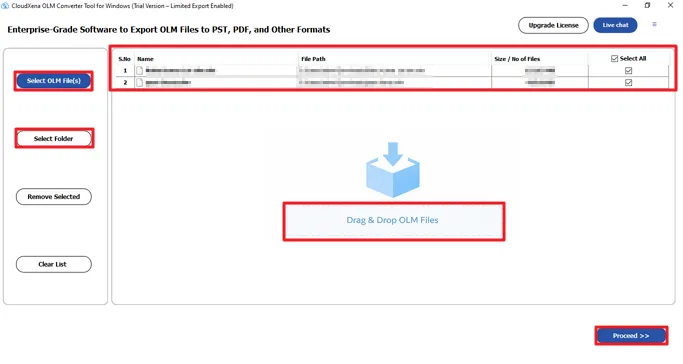
You can load all your OLM files at once and migrate everything to Office 365 in a single run. Emails, contacts, calendars, tasks, and notes — all of it gets transferred without any file size restrictions and without losing a single item.
Apart from Office 365, the tool also lets you save OLM data in formats like PST, MBOX, EML, MSG, PDF, CSV, and more. So if you ever need the data in a different format later, you're not stuck.
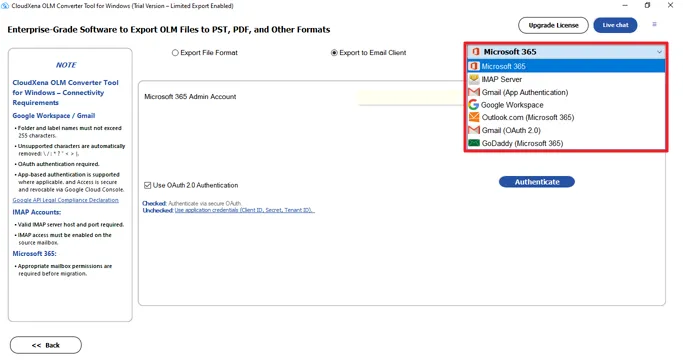
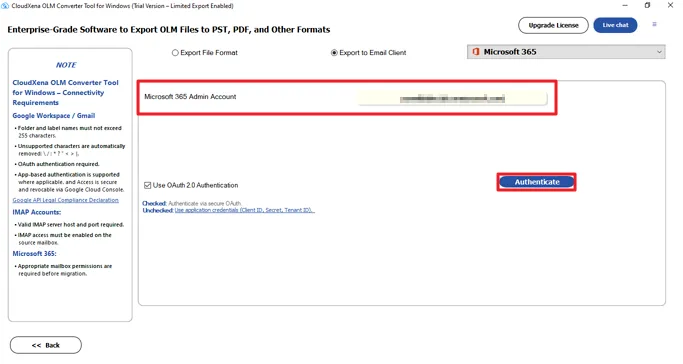
The tool connects directly to Office 365 and pushes your OLM data across without any intermediate steps. It also allows users to import OLM to Google Workspace, Thunderbird, Gmail, GoDaddy, and IMAP accounts using secure OAuth authentication.
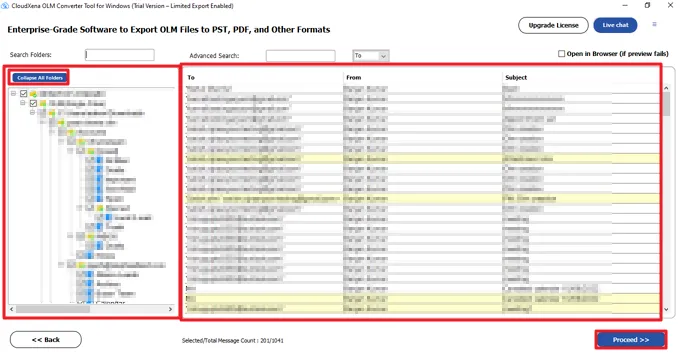
Before anything gets migrated, you can preview the mailbox data and check that everything looks right. The folder structure stays exactly as it was, and the tool runs in read-only mode on your source files, so nothing gets touched or altered during the process.
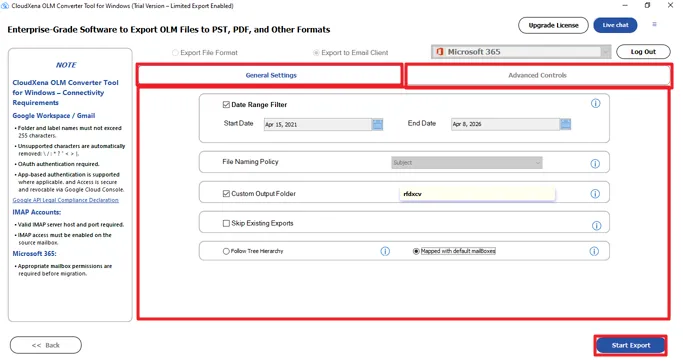
If you've got repeated emails sitting in your OLM files, the tool catches them and skips them during migration. It matches duplicates based on To, From, Subject, Bcc, and Body fields. You can save results to the same location or pick a different folder.
The date filter lets you set a start and end date and migrate only the emails from that specific period. You can also choose whether to include attachments or skip them, save attachments separately, or export data to PDF if needed.
The tool comes with a few extra options that give you more control — custom folder naming so your migrated files are easy to find, PST splitting for handling large OLM files, and a CSV field option if you need an Excel-based output for specific data.
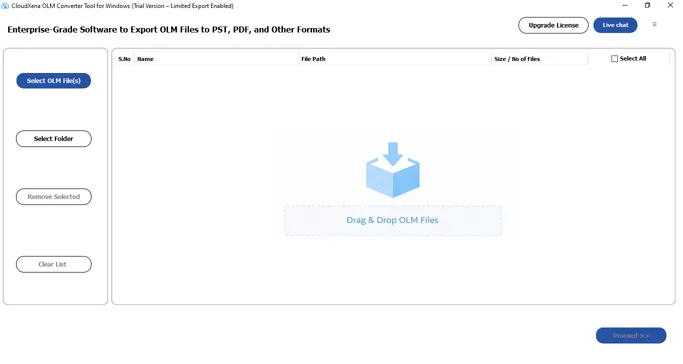
You don't need Outlook for Mac installed anywhere on the system. The tool works on its own and is straightforward enough for both technical and non-technical users. Just follow the steps, and the migration runs without needing any special setup.
Key --
Version: 26.02
Size: 245 MB
License: S/A/E/T
System Requirements --
Processor: Intel® Core™2 Duo E4600 Processor 2.40GHz
Memory: 500 MB required (1 GB recommended)
Operating System: 11, 10/8.1/8/7/, 2008/2012 (32 & 64 Bit), and other Windows versions.
Technical Guide --
Note: You can preview your OLM data, check how the migration works, and convert up to 50 emails per folder with the demo version.
| Product Feature | Free Version | Full Version |
|---|---|---|
| Convert OLM files to PST, MBOX, EML, MSG, PDF, CSV, DOCX, VCF, ICS | 50 Emails Per Folder | All |
| Import OLM to IMAP, Office 365, Gmail, G Suite, Thunderbird | 50 Emails Per Folder | All |
| Works without Outlook for Mac installed on the system | ||
| Load and process multiple OLM files together | ||
| Preview OLM mailbox data before starting migration | ||
| No file size restriction on OLM files | ||
| Remove duplicate emails, calendar entries, and contacts | ||
| Split large PST files into smaller parts | ||
| Migrate specific emails instead of the entire mailbox | ||
| Set custom file names for converted output | ||
| Compatible with all Outlook for Mac versions | ||
| 24/7 tech support with secure processing | ||
| Download | Purchase Now |
Testimonials
"Here's what some of our users have to say after using CloudXena OLM to Office 365 Migration Tool on their real migration projects."
Mac to Windows. I was honestly dreading the whole thing. Tried CloudXena OLM to Office 365 Tool, and it handled everything in one batch without breaking a sweat. The folder structure came through perfectly, and not a single email was missing. Saved us probably two days of manual work."
- James R.
IT Administrator
USA
"I've used a few migration tools before, and most of them either mess up the folder hierarchy or drop attachments somewhere along the way. CloudXena OLM to Office 365 Migrator actually did what it promised. The preview feature was really useful — I could check everything before committing to the migration. No surprises on the other end."
- Paul M.
Systems Engineer
UK
"Honestly I wasn't expecting much from the free demo, but it converted 50 emails per folder cleanly and showed me exactly how the full version would perform. I bought it the same day. The date filter saved me a lot of time — I only needed emails from the last two years, and it pulled just those without any fuss."
- Daniel K.
Network Admin
Canada
"One of my clients had duplicate emails all over their OLM files from years of disorganized backups. The duplicate removal feature in CloudXena OLM Converter cleaned that up during migration automatically. Their Office 365 mailbox came out way cleaner than their original OLM data was. That alone made the tool worth it."
- Sophie L.
IT Consultant
Australia
"What I liked most was that it doesn't need Outlook installed to run. We were setting up new Windows machines and didn't want to deal with Outlook just to migrate old Mac data. The OLM to Office 365 Migration Tool ran fine on its own, connected directly to Office 365, and pushed everything across without any errors. Clean and straightforward."
- Colney T.
Senior System Admin
Philippines