CloudXena

OST to Office 365 Migration Tool

Rated ( 4.8/5 ) by 5543 Users

The CloudXena OST to Office 365 Migration Tool is a quick solution that makes the conversion of OST to Office 365 simple and secure. The tool has a simpler interface and can be used on both Windows and Mac systems. It has a wide range of filters that help users o optimize their output.

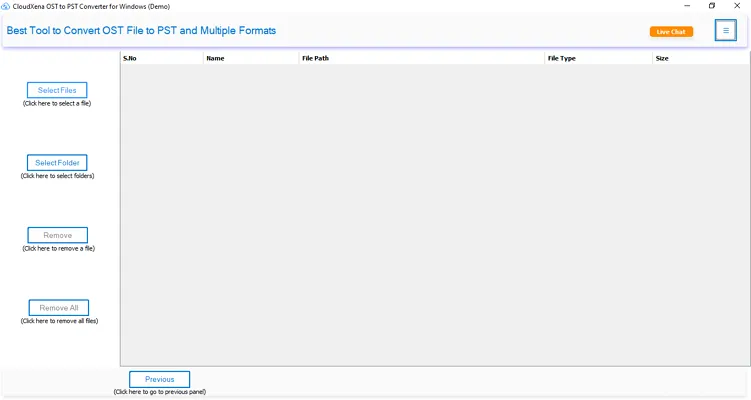
  • Move a single OST file or a whole batch of them into Office 365 at the same time.
  • Supports conversion of OST to PST, PDF, MBOX, EML, and more if needed.
  • Directly import OST to Office 365, Thunderbird, iCloud, and other email platforms.
  • Gives a preview feature to verify the files or folders before the process.
  • Filter and move only the emails that fall within a specific date range you set.
  • You can choose to migrate email with or without attachments.
  • Automatically detects and removes duplicate emails from OST files.
  • Offers a feature to break down large OST data into smaller parts.
  • Runs on both Mac and Windows without any compatibility issues.
product-box

Why Choose the OST to Office 365 Converter Software?

What is the OST to Office 365 Migration Wizard?

Manual process is not easy if you want to move your OST files saved in your system to Office 365. Because OST files are tied to the Exchange Server, which cannot be opened like we open our normal files. Here, we need a professional tool like CloudXena OST to Office 365 migration tool to directly import OST to Office 365. It is simple to use and helps to handle the files in bulk with 100% accuracy. Even non-technical users can use it without any issues.

  1. Those users who are moving to Office 365 from a local Exchange Setup.
  2. Admins of any IT company want to migrate email data to the cloud.
  3. Users who lost their data need to recover the OST file data.
  4. Anyone who wants to access old OST emails inside their Office 365 account.

Why Use CloudXena OST to Office 365 Migrator Tool?

There are a few free or manual ways to get OST data into Office 365, but most of them are unreliable or need Outlook to be set up properly. This tool skips all that and gives you a direct, clean migration path. It doesn't matter how big your OST file is; there's no size restriction. And since it works without Outlook, you don't have to worry about your Exchange server being active or accessible.

The interface is simple enough that even non-technical users can get through it without needing any help. There is 24/7 support available for the user to resolve their query during the migration process.

Also Supports Other Formats

This tool can also export or migrate OST files to PST, PDF, MBOX, EML, MSG, CSV, and several other formats. Moreover, you can import OST to IMAP, Gmail, Thunderbird, iCloud, and AOL.

Key Features of CloudXena OST to Office 365 Migration Tool

batch-conversion

Bulk Import OST Files to Office 365

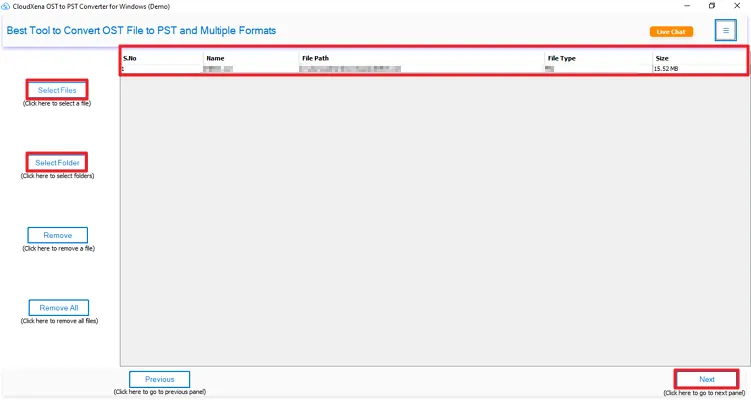
The tool allows you to add a single OST file or multiple files at once and migrate everything to Office 365 mailboxes without touching the original data. Your important data from OST files, like emails, contacts, tasks, and other items, all move over without data manipulation.

Multiple Format Saving Option

Migrate OST to M365 Mailboxes

You can migrate OST files directly to different Office 365 folders quickly and with proper accuracy. Whether it's a Primary Mailbox, Shared Mailbox, or Online Archive Mailbox. There are no limitations on the file size. It keeps the process secure, and your folder structures remain the same.

remove-duplicates

No Duplicate OST Migration

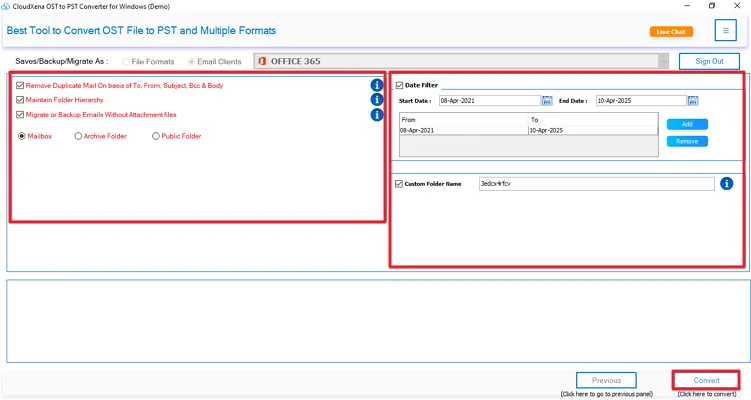
There's a built-in Remove Duplicate filter that stops duplicate items from OST files from moving to your Office 365 account. You can set it to check duplicates based on To, From, Subject, Bcc, or Body fields, whichever works for you. This feature helps you to avoid the same files again and optimizes your space.

email-attachments

Skip OST File Attachments

Sometimes users want to migrate only their email content from OST to Office 365. If you don't want to carry attachments along with your emails, just enable this option, and the tool will migrate only the mail data. Additionally, you can also set a custom folder name and pick where you want the output saved.

Duplicate Deletion Feature

Easy to Use GUI

The CloudeXena OST to Office 365 importer is very simple to use. The interface of this utility is clean and doesn't take long to figure out. A few clicks and you're through the whole process. It works the same way for both technical and non-technical users, no learning curve needed.

preview

Smart OST File Preview Feature

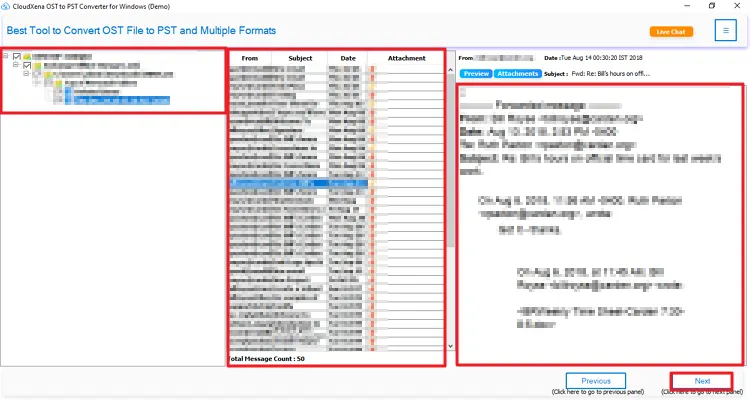
Before migrating anything, you can preview the full content of your OST files, including attachments, metadata, and folder structure. Your data appears in a tree-like structured format that you can expand hierarchically. This feature helps users to identify and select the data that they want to migrate.

conversion-without-attachments

Generate Log Reports

Once the migration is done, the tool gives you a detailed log report of everything that was migrated. You can download it and go through the data to just ensure that the process is completed without trouble. This log report is also used by our support team if any errors occurred during your export.

filter

Selective OST Data Migration

The tool has several features to optimize your results, one of which is the Date Range Filter. If you only need emails from a specific time period, you can use this smart feature. You have to enter the start or the end date, and the tool will start migrating the data within that date range.

folder-name

Migrate OST to O365 Without Outlook

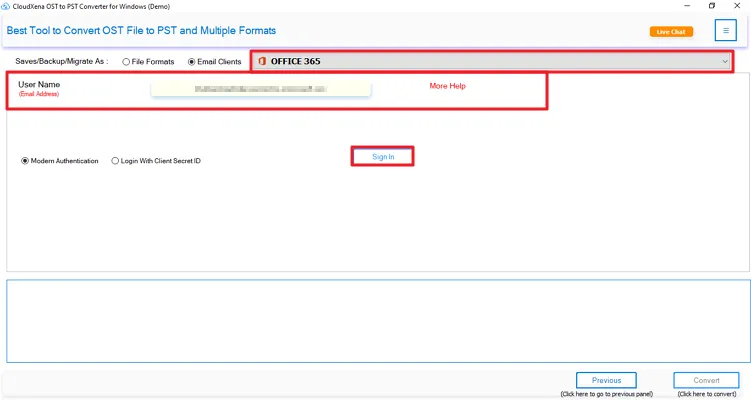
You don't need Outlook or an active Exchange Server to use this tool. This tool connects with Office 365 directly through its credentials, such as user ID or the App Password. It is useful for users who want an easy and direct migration process in just a few steps.

Platform-Independent Conversion

All Windows OS Support

The CloudXena OST to Office 365 Converter Software runs on all major Windows versions. It includes Windows 11, 10, 8.1, 8, 7, XP, and Vista. It also supports both ANSI and UNICODE OST files created in any Outlook version, whether 32-bit or 64-bit.

Technical Specification of OST to Office 365 Converter

Key --

Version: 26.03

Size: 255 MB

License: S/A/E/T

System Requirements --

Processor: Intel® Core™2 Duo E4600 Processor 2.40GHz

Memory: 8 GB (16 GB Recommended)

Operating System: 11, 10/8.1/8/7/, 2008/2012 (32 & 64 Bit), and other Windows versions.

Note: The demo version of the CloudXena OST to Office 365 Migration Tool lets you migrate up to 50 emails per folder for free.

Frequently Asked Question
Ans- The tool is used to convert your OST file into Office 365 directly without Outlook. It helps to migrate all the details in a single and streamlined process.
Ans- Yes, the professional utility is built for both individual or enterprise level use. Provides an option to migrate single or multiple OST file/folder(s).
Ans- It supports Microsoft Outlook 2007, 2010, 2013, 2016, 2019, and Microsoft 365.
Ans- The tool is compatible with Windows 11, 10, 8.1, 8, and 7 (both 32-bit and 64-bit editions).
Ans- It migrates all major mailbox components, including emails, calendar, contacts, tasks, notes, and journal entries.
Ans- The tool does not change the content and the folder structure during the migration process.
Ans- Yes. The tool provides a selective migration option by date range, specific folders, or item type before initiating the migration.
Ans- Yes. The smart utility offers a free evaluation version to migrate 50 emails per folder to Office 365.
Free vs Full Version of OST to Office 365 Migration Wizard
Product Feature Free Version Full Version
Save OST to PST, MBOX, PDF, EML, and more 50 Emails Per Folder All
Import OST to Yahoo, Gmail, Office 365, Thunderbird, and more 50 Emails Per Folder All
Import OST to Office 365 Shared, Archived, and Primary Mailbox 50 Emails Per Folder All
Remove duplicate emails from the mailbox
Preview emails before conversion
Convert multiple OST files at once
Export emails without their attachments
Break the large PST output into smaller parts
Filter and migrate emails by date range
Set custom file names and choose a save location
24*7 technical support
Download Purchase Now

Testimonials

Trusted by Users Worldwide

For years, we have worked to make OST migration simple, safe, and stress-free. Our clients have seen the results firsthand — and these are their words.